
It's just Sew-tastic!
Type a name, bring in a picture or a drawing, and Sew-tastic! turns it into a stitch file your embroidery machine understands. No digitizing degree needed.
- One-time price, no subscription
- Works without internet
- 8 machine file types
- Windows 10 & 11
- 1 year of updates included
From idea to hoop in six easy steps
Every step is right there on the screen, in plain words. Here's what it looks like.
Type your words in any font
Every font on your computer works, from tidy block letters to curly script.
- Set the letter height, spacing and line up
- Curve words into an arch or a smile
- Pick the thread color and add a satin border
Bring in a picture and tidy it up
Drop in a PNG, a JPG or an SVG drawing. Sew-tastic! cleans it up for thread.
- Crop and turn it
- Remove the background, often automatically
- Reduce it to a few thread colors and change any of them
- Clean up specks, then trace it into stitchable shapes
Watch it turn into stitches
Sew-tastic! fills shapes with smooth fill stitches, outlines with satin and running stitches, and puts the colors in a sensible order.
- See the live stitch preview next to your artwork
- Threads are matched to Isacord, Madeira, Robison-Anton, Sulky or Viking charts
- See the size, stitch count, sewing time and whether it fits your hoop
- Every file is checked before it's saved
Save it for your machine
Pick your machine and Sew-tastic! writes the right file type. Save it straight to a USB stick, then take it to your machine.
- Husqvarna Viking, Pfaff, Brother, Baby Lock, Janome, Elna, Singer, Bernina, Tajima, Melco, Barudan and more
- Already have a design for a different machine? Make a copy for yours
- Thread names and numbers go into the file wherever the machine supports them
Keep every design tidy in My designs
All your designs live in one place, with a picture of each one so you never have to guess what "design_0412.pes" was.
- Folders in a tree, with designs as a picture grid or a list
- Rename, move, copy and delete (deleted designs go to the Recycle Bin)
- Search every folder by name, or show only one machine's files
- Open any design to see it stitch out, step by step
Print a sewing sheet, and sew!
One page, in plain words, with everything you need at the machine. Tick off each thread as you go.
- A picture of the finished design and its exact size
- Which hoop to use, how many stitches, and about how long it takes
- Each thread in order, with its brand, number and name
- Print it, or save it as a PDF
Sewing sheet
Take a look inside
These are real screenshots of Sew-tastic! for Windows.
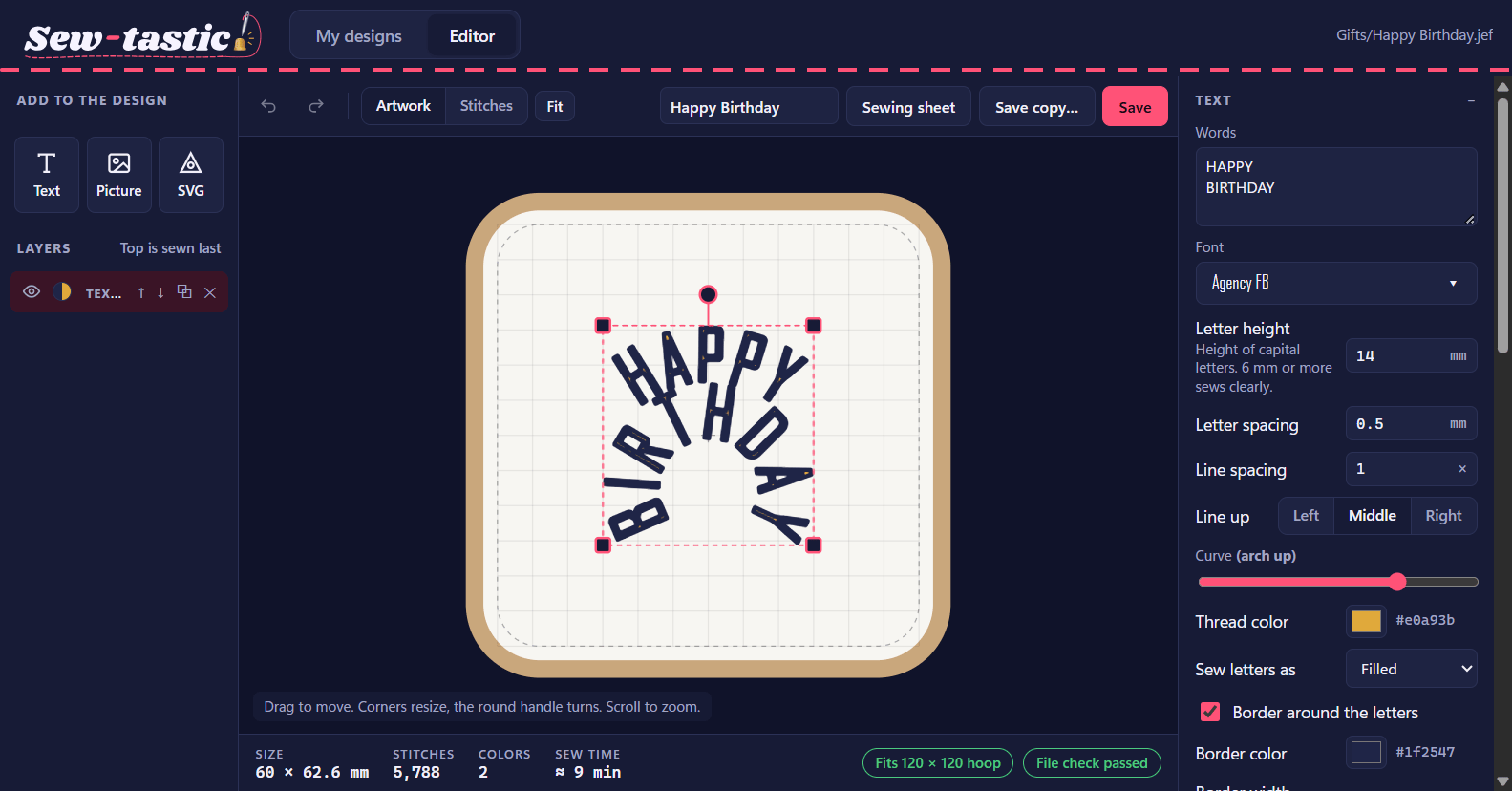
The editor: curved "Happy Birthday" lettering with a border, ready to save.
All the features, in one place
Sew-tastic! is made for people who'd rather be sewing than fiddling with software.
Lettering
- Any font installed on your computer
- Letter height, letter spacing and line spacing
- Line up left, middle or right
- Arch or smile curves
- Satin border around the letters
- Several lines of text in one layer
Pictures
- PNG, JPG and other picture files
- Crop and turn
- Automatic background removal for plain backdrops
- Reduce to 2 to 16 thread colors (or let it suggest)
- Recolor or leave out any color
- Speck clean-up, then gap-free tracing
Drawings (SVG)
- Bring in SVG drawings from any drawing program
- Change the thread for any color
- Leave out colors you don't want sewn
- Filled shapes, satin outlines and running lines
Layers and the hoop
- Mix text, pictures and drawings in one design
- Move, resize, turn and mirror each layer
- Change the sewing order of layers
- Undo and redo
- 15 hoop sizes, from 100 × 100 up to 360 × 350 mm
- Switch between artwork and a live stitch preview
Threads and stitches
- Thread charts: Isacord, Madeira, Robison-Anton, Sulky and Viking
- Closest thread picked for every color
- Fill, satin and running stitches
- Stitch count, size and sewing time
- Checks the design fits your hoop
- Every saved file is read back and checked
My designs
- Folder tree, picture grid or details list
- Adjustable picture size
- A colored badge for each machine type
- Rename, move, copy and delete to the Recycle Bin
- Search all folders; filter by machine
- Drag files in from File Explorer
Design viewer
- Open designs made in other programs too
- Size in mm and inches, stitches, colors and time
- Step through the sewing order, or play it
- See the thread list in order
Sewing sheet
- A one-page job sheet in plain words
- Picture, size, hoop, stitches and time
- Threads in order with tick boxes
- Print it or save it as a PDF
Made for Windows
- Windows 10 and 11
- Works without the internet
- Easy installer, no administrator password
- Your designs stay on your computer, in Documents
- Light and dark look follow Windows
Saves for every major brand
Choose your machine when you save. Sew-tastic! writes the file type it reads.
It also opens .hus .shv .sew .dsb .tbf designs to view and convert, and keeps .vip and .pcs files organized.
Brand names belong to their owners. Sew-tastic! isn't made by or connected with any machine maker.
- Every feature: lettering, pictures, drawings, all 8 machine types
- My designs organizer and sewing sheets
- Unlimited designs, no per-design fees
- Activates one Windows computer
- One year of updates included. We're adding new features all the time.
Your download link is emailed as soon as you pay.
Sewing in three steps
Pay, and your download link arrives by email. Each copy of Sew-tastic! is unlocked with a code made just for your computer.
Good to know
Which embroidery machines does it work with?
Is it a subscription?
What is a "computer code"?
How soon do I get my unlock code?
How do I download it?
Do I get updates?
What if I get a new computer or reinstall Windows?
Do I need the internet?
Something isn't working, or I have an idea. How do I reach you?
Does it work on a Mac or an iPad?
Can I open designs I bought or downloaded?
Grab your thread.
It's just Sew-tastic!
Pay once and keep it. Just $99, with a year of updates included.